NOVSKY Download Novsky

Your own AI team, on your own server.

Novsky is a Mac app that installs Claude-powered agents on a VPS you control. Each agent gets a Telegram bot, memory, skills and a role — and Novsky keeps checking that it answers. Nothing to type into a terminal to run your agents.

The fleet screen, explained

The Novsky fleet screen: six agents on two servers, each with its Telegram bot, model, server and kit, all reported online
  1. 1

    One app for the whole fleet

    Agents, org chart, shared knowledge, skills and settings — every server you run, in one window on your Mac.

  2. 2

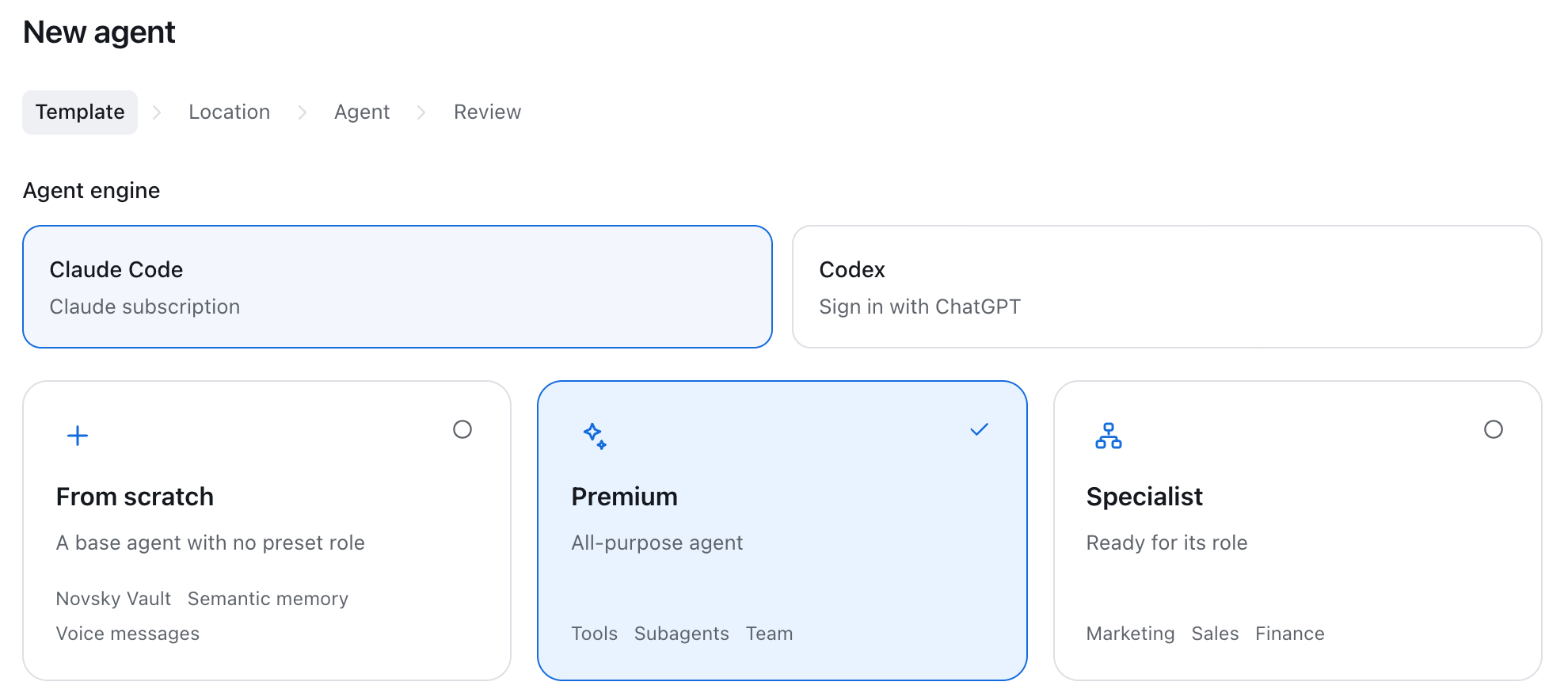
    New agent in four steps

    Pick a template, point at a server, name the bot, review. Novsky does the SSH, the packages and the service for you.

  3. 3

    A bot with a name and a role

    Every agent is a Telegram bot: a name, a kit that defines its job, and the server it lives on.

  4. 4

    Honest state, re-checked every minute

    Online, silent, needs sign-in, queue stuck — Novsky says what is actually happening, and offers one button to fix it.

  5. 5

    Grows with the team

    Filter by server or search by name. Several servers, several teams, one screen.

  6. 6

    Choose the model per agent

    Opus for the thinker, Sonnet for the fast one. Switch any time; the next reply uses the new model.

Demo fleet: names and addresses are examples.

Runs on
macOS & Windows app · Ubuntu VPS
Engine
Claude Code or Codex
Talks in
Telegram, voice included
Connects to
Google Workspace, Vercel
Data lives
On your server only

Installed in four steps, without a terminal.

You bring a fresh VPS from any provider, a bot token from BotFather and a Claude subscription. Novsky brings everything else.

  1. Template

    Start from scratch, take Premium, or pick a specialist: marketing, sales, finance, operations and more.

  2. Server

    Paste the IP and password from your provider's email. Novsky connects over SSH and prepares Ubuntu itself.

  3. Agent

    Name the bot, paste the token, choose the time zone. Sign in to Claude by opening one link.

  4. Review

    Watch the stages complete in plain language. The last one is your bot answering you in Telegram.
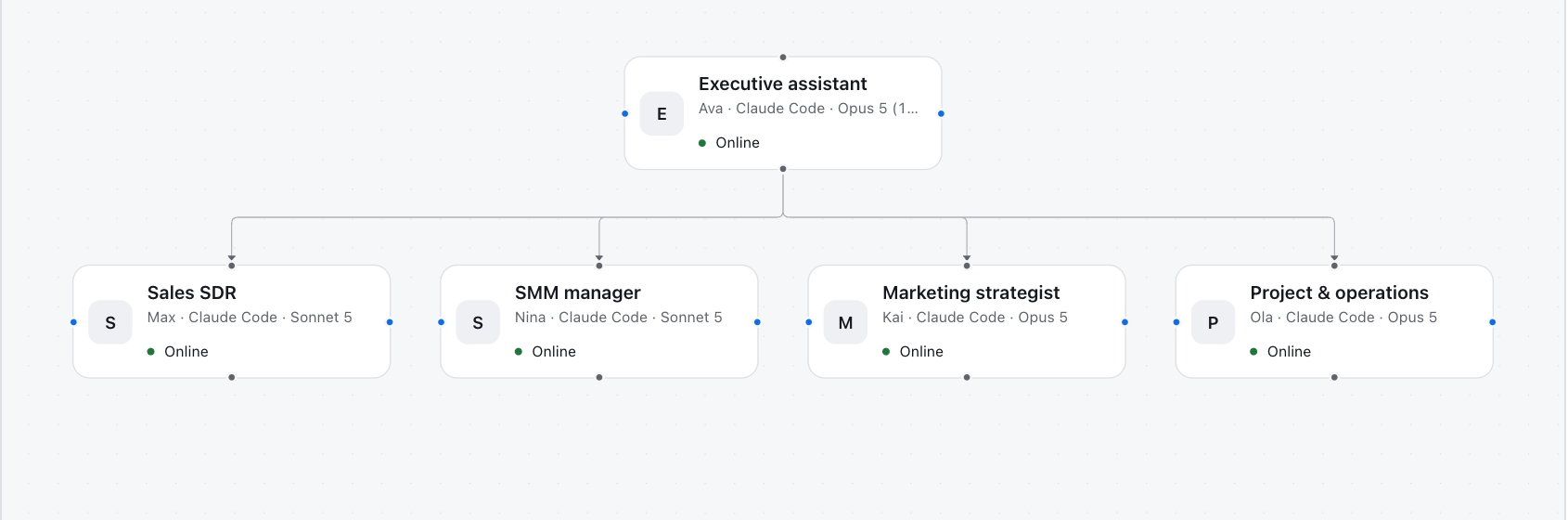
Agents that report to each other.

Agents on one server can report to each other and hand work down the line. An executive assistant that delegates to sales, marketing and operations is an org chart you draw, not a prompt you hope for.

Reporting lines and collaborations are set per server. Assign tasks, see results come back, keep company knowledge in a shared Brain.

What every agent ships with.

A working assistant with a memory, hands and a phone number, rather than a thin wrapper around a model.

Memory
A private vault of notes the agent keeps and indexes, plus semantic memory so it recalls by meaning, not by keyword.
Voice
Send a voice message in Telegram; the agent transcribes it and answers like it was text.
Google Workspace
Calendar, Gmail, Docs, Sheets, Drive, Meet and Contacts — connected with one click of consent, tokens kept on your server.
Publishing
Builds a page and puts it live on Vercel with a link you can send.
Skills
46 skills in Premium: research, spreadsheets, video, images, social media, finance data. Turn any of them off in one click.
Team sessions
Give employees access to the same bot: each gets an isolated session with only the rights the owner grants.
Health watch
A watchdog catches stuck queues, expired sign-ins and usage limits, and tells you before your team notices.
Backups
Full backups of the agent's memory and settings to your own GitHub, with restore built in.

Your data stays on your server.

No Novsky cloudNovsky has no servers of its own. The app on your Mac talks straight to your VPS over SSH.

Your keys, your boxBot tokens, Claude sign-in and Google access live in an encrypted store on the agent's server, never with us.

Revoke any timeDisconnect Google in your account settings, remove an agent from the app — nothing lingers anywhere else.

Read the privacy policy and terms of service.

Get Novsky.

Free app. Paid agent templates are activated with a key, one key per bot.

macOS · Latest pilot release · updates install from inside the app · all releases

Windows 11 · x64 · Latest Windows pilot

The Windows pilot installer is not yet signed with a Microsoft-trusted publisher certificate. Windows may show an unknown-publisher warning.

First launch on macOS — one Terminal command until the pilot build is notarized

Pilot builds are not yet notarized by Apple, so macOS may refuse to open the app after you drag it to Applications. Run this once in Terminal, then open Novsky normally. Installing and running agents never needs a terminal.

xattr -dr com.apple.quarantine /Applications/Novsky.app